Raosoft Calculator
Do you need to find out how many respondents you need for your thesis? Are you stuck on Chapter 3 of your research paper? You are not alone. Thousands of students and researchers face this problem every day.
The Raosoft calculator is one of the most trusted tools for this job. It helps you find the right sample size for any survey or study. It is free, fast, and easy to use. Best of all, it gives you results that your thesis adviser will accept.
In this guide, you will learn exactly what the Raosoft sample size calculator is. You will also learn how to use it step by step. We will cover the formula behind it, how to use it for your thesis in the Philippines, how to cite it in APA format, and how it compares to the Slovin formula.
By the end of this article, you will know how to use this tool with full confidence.
What Is the Raosoft Calculator?
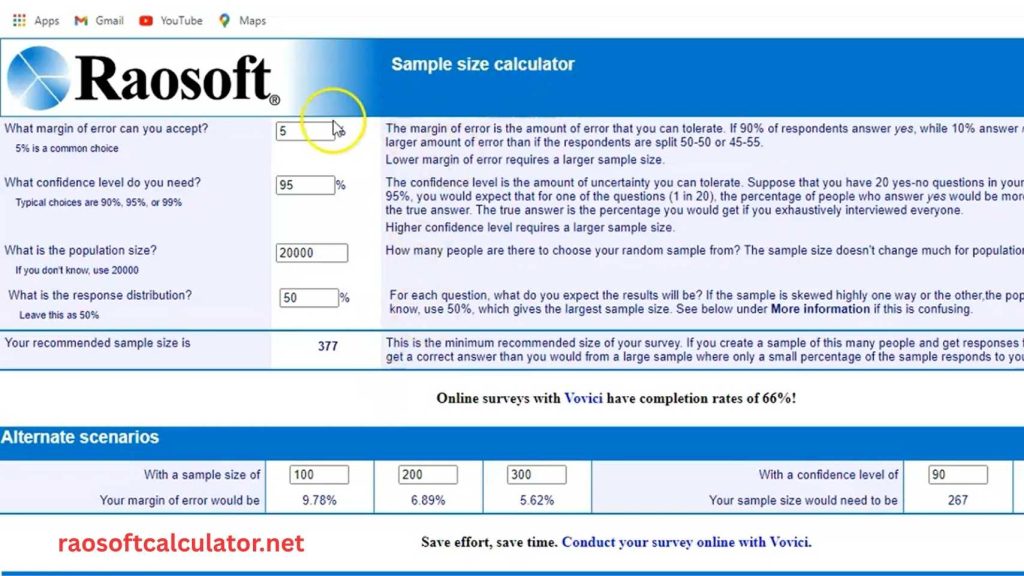
The Raosoft calculator is a free online tool made by Raosoft, Inc. It helps researchers find the correct sample size for a survey or study. You can find it at the official website:https://raosoftcalculator.net/
Raosoft, Inc. is a company that builds survey and data collection software. They created this tool to help researchers at all levels. From undergraduate students to professional academics, anyone can use it.
When you do research, you cannot always study every single person in a group. For example, if you want to study 10,000 college students, you cannot talk to all of them. So you study a smaller group instead. That smaller group is called your sample. The number of people in your sample is called your sample size.
Getting the right sample size is very important. If your sample is too small, your results may not be accurate. If your sample is too large, you waste time and money. The Raosoft sample size calculator finds the best number for you.
Researchers around the world use this tool in their work. In the Philippines alone, hundreds of thesis papers cite the Raosoft calculator every year. It is commonly used in universities like UP, UST, DLSU, and Ateneo de Manila.
The 4 Key Input Variables of the Raosoft Calculator
To use the Raosoft calculator correctly, you need to understand its four inputs. Each one affects your final sample size.
1. Population Size (N) This is the total number of people in the group you are studying. For example, if you are studying all employees in a company with 500 workers, your population size is 500. If you do not know the exact number, you can leave this blank and Raosoft will assume a very large population.
2. Margin of Error (e) The margin of error tells you how much your results can differ from the true population value. A 5% margin of error is the most common choice for social science research. It means your results are accurate within plus or minus 5 percent. For medical or clinical research, a 3% margin of error is often required.
3. Confidence Level (Z) The confidence level tells you how sure you are that your sample results reflect the real population. A 95% confidence level is the gold standard in most research. It means you are 95% certain that your results are accurate. The 95% confidence level uses a Z-score of 1.96 in the formula. A 99% confidence level gives more certainty but needs a bigger sample.
4. Response Distribution (p) This is the expected percentage of your population that will give a particular answer. If you are not sure, use 50%. This gives the largest possible sample size and keeps your research safe.
| Input Variable | Recommended Value | What It Means |
| Population Size (N) | Actual total count | The full group you are studying |
| Margin of Error (e) | 5% | Acceptable error range in your results |
| Confidence Level (Z) | 95% | How certain you are in your results |
| Response Distribution (p) | 50% | Expected proportion giving a specific answer |
How to Use the Raosoft sample size calculator Step by Step
Using the Raosoft sample size calculator is simple. Follow these steps and you will have your answer in under one minute.
Step 1: Go to the Raosoft Website
Open your browser and go to raosoftcalculator.net. You will see a simple form with four input fields. No sign-up is needed. No payment is required.
Step 2: Enter Your Population Size
Type in the total number of people in your study group. For example, if you are studying 800 students in your school, type 800 in the population size field.
If your population is very large (like all adults in a country), just leave the default number or type a very high number like 1,000,000.
Step 3: Set Your Margin of Error
The default is 5%. For most thesis research and social science studies, keep it at 5%. If you are doing health or medical research, change it to 3%.
For Philippine university theses, most advisers and panelists accept a 5% margin of error at 95% confidence level.
Step 4: Choose Your Confidence Level
The default is 95%. This is what most researchers use. Leave it at 95% unless your research requires a higher level of certainty.
Some studies use 90% to get a smaller sample size. But for thesis research in the Philippines, 95% is the standard and is widely accepted by reviewers.
Step 5: Set Your Response Distribution
Keep this at 50% if you are not sure about your population’s response pattern. This is the safe default. It gives you the largest sample size, which protects your research accuracy.
Step 6: Click “Calculate” and Read the Result
After you fill in all four fields, click the calculate button. The tool will show you the minimum recommended sample size. This is the number of respondents you need to collect data from.
Worked Example:
- Population Size: 800
- Margin of Error: 5%
- Confidence Level: 95%
- Response Distribution: 50%
- Result: 260 respondents
This means if you are studying a group of 800 people, you need at least 260 respondents to get statistically valid results.
Pro Tip: Add 10–15% for Non-Response
In real research, not everyone you approach will agree to answer your survey. Some questionnaires are left blank or returned incomplete. To cover this, add 10 to 15 percent extra to your sample size.
For the example above: 260 + 15% = 299 respondents. Round it up to 300 to be safe.
Common Mistakes When Using the Raosoft Calculator
Many students and researchers make small errors when using Raosoft. These mistakes can weaken your methodology section. Here are the most common ones and how to avoid them.
Mistake 1: Entering the wrong population size Some students type the number of people in their school, city, or country instead of the actual study group. Your population size should match your research scope exactly. If you are studying only Grade 11 students in your school, your population is the total number of Grade 11 students — not the whole school.
Mistake 2: Using a confidence level that does not match the research type A 95% confidence level is standard for social science and educational research. But some students use 90% just to get a smaller sample. This is not always wrong, but you must justify it in your methodology. Most thesis panelists in the Philippines expect 95%.
Mistake 3: Forgetting the non-response buffer Raosoft gives you the minimum number of respondents needed. But in real surveys, some people do not respond. If you collect exactly the minimum number, you may fall short. Always add 10% to 15% extra to your target.
Mistake 4: Changing inputs after data collection starts Some students compute the sample size using one set of values, then change the inputs after getting results they do not like. This is a serious research error. Your sample size must be fixed before you begin data collection. Document your Raosoft settings in Chapter 3.
Mistake 5: Not citing the tool in the references Many students use Raosoft but forget to include it in their reference list. This can be flagged during the panel review. Always add the APA citation covered in Section 5 of this article.
The Formula Behind the Raosoft Calculator (Cochran Formula Explained)
The Raosoft sample size calculator uses the Cochran formula. This formula was developed by statistician W.G. Cochran in 1977. It is one of the most widely accepted methods for sample size calculation in quantitative research.
The Cochran Formula
The basic formula has two steps:
Step 1 — Initial Sample Size (n₀):
n₀ = (Z² × p × (1 − p)) / e²
Step 2 — Finite Population Correction (n):
n = n₀ / (1 + (n₀ − 1) / N)
Where:
- Z = Z-score for your confidence level (1.96 for 95%)
- p = estimated response proportion (0.5 for maximum variability)
- e = margin of error in decimal form (0.05 for 5%)
- N = total population size
Manual Calculation Example
Let us use the same example: Population = 800, Confidence = 95%, Margin of Error = 5%, Response Distribution = 50%.
Step 1: n₀ = (1.96² × 0.5 × 0.5) / 0.05² n₀ = (3.8416 × 0.25) / 0.0025 n₀ = 0.9604 / 0.0025 n₀ = 384.16 ≈ 385
Step 2 (Finite Population Correction): n = 385 / (1 + (385 − 1) / 800) n = 385 / (1 + 0.48) n = 385 / 1.48 n ≈ 260 respondents
This matches exactly what Raosoft gives you. The finite population correction (FPC) is what makes Raosoft’s result smaller than the raw formula. For small populations, this correction makes a big difference. For very large populations, the FPC has almost no effect.
Understanding this formula helps you explain your methodology to your thesis adviser with confidence.
Raosoft Calculator for Thesis in the Philippines (Chapter 3 Methodology Guide)
In the Philippines, the Raosoft sample size calculator is one of the most commonly used tools for thesis research. Students from undergraduate programs to graduate studies rely on it for Chapter 3 of their research papers.
Here is why Filipino students use it so often:
- It is free and online — no need to install software
- It uses the Cochran formula, which is accepted by most Philippine universities
- It gives a clear, defensible number that panelists and advisers accept
- It is easy to explain in your methodology section
What Values Are Accepted by Philippine University Reviewers?
Most thesis reviewers and panelists in UP, UST, DLSU, Ateneo, and other Philippine universities accept the following standard values:
| Setting | Accepted Value |
| Margin of Error | ±5% |
| Confidence Level | 95% |
| Response Distribution | 50% (if unknown) |
| Non-Response Buffer | +10% to +15% |
Pre-Calculated Sample Size Reference Table
Use this table if you already know your population size. All values use 95% confidence level and ±5% margin of error — the standard for Philippine social science research.
| Population Size (N) | Minimum Sample Size (n) |
| 50 | 44 |
| 100 | 80 |
| 200 | 132 |
| 300 | 169 |
| 400 | 196 |
| 500 | 217 |
| 700 | 248 |
| 800 | 260 |
| 1,000 | 278 |
| 1,500 | 306 |
| 2,000 | 322 |
| 3,000 | 341 |
| 5,000 | 357 |
| 10,000 | 370 |
| 100,000+ | 384 |
How to Write About Sample Size in Chapter 3
Many Filipino students are unsure how to write about their sample size in their thesis. Here is a ready-to-use paragraph you can adapt for your own Chapter 3:
“The sample size of this study was determined using the Raosoft Sample Size Calculator (Raosoft, Inc., 2004), an online tool that applies the Cochran (1977) formula with finite population correction. Using a 95% confidence level, a 5% margin of error, and a 50% response distribution, the calculated minimum sample size was [n] respondents from a total population of [N]. An additional 15% was added to account for non-response, bringing the final target sample to [adjusted n] respondents.”
How to Cite the Raosoft Calculator in APA Format
One of the most searched questions among Filipino students is how to properly cite the Raosoft calculator in their thesis or research paper. Here is the correct format.
APA 7th Edition Reference List Entry
Raosoft, Inc. (2004). Sample size calculator [Online calculator]. Retrieved from http://www.raosoft.com/samplesize.html
In-Text Citation (APA 7)
(Raosoft, Inc., 2004)
Example in a sentence:
“The sample size was calculated using an online tool (Raosoft, Inc., 2004) at a 95% confidence level and a 5% margin of error.”
Important Notes on Citation
- Use 2004 as the year. This is the original publication year of the Raosoft calculator.
- Some researchers use the year they accessed the site (e.g., 2026). Either is acceptable, but 2004 is most commonly used in published research.
- Always check with your thesis adviser or institution’s citation guide to confirm the preferred format.
- If your school uses APA 6th edition, the format is nearly identical — just check the italics placement for the tool title.
Raosoft Calculator vs Slovin Formula: Which Should You Use?
Both the Raosoft calculator and the Slovin formula are popular tools for computing sample size. In the Philippines especially, many students wonder which one to use. Here is a clear comparison.
What Is the Slovin Formula?
The Slovin formula was introduced by Yamane (1967) and is often credited to Slovin. It is a simpler formula used to find sample size from a finite population.
Slovin Formula:
n = N / (1 + N × e²)
Where:
- n = sample size
- N = population size
- e = margin of error (in decimal)
Example using N = 800, e = 0.05: n = 800 / (1 + 800 × 0.05²) n = 800 / (1 + 800 × 0.0025) n = 800 / (1 + 2) n = 800 / 3 n ≈ 267 respondents
Side-by-Side Comparison
| Feature | Raosoft (Cochran Formula) | Slovin Formula |
| Formula Basis | Cochran (1977) — statistically robust | Yamane (1967) — simplified |
| Inputs Required | Population, confidence, margin of error, response distribution | Population, margin of error only |
| Confidence Level Control | Yes — you can set 90%, 95%, 99% | No — fixed assumption |
| Best For | Quantitative survey research | Quick estimates only |
| Accepted in PH Thesis? | Yes — widely accepted | Yes — but sometimes questioned |
| Result for N=800, e=5% | 260 respondents | 267 respondents |
| Statistical Accuracy | Higher — uses Z-score and FPC | Lower — simplified approximation |
Which One Should You Use?
Use Raosoft (Cochran formula) when:
- You are doing formal quantitative research
- Your thesis requires a clearly defensible methodology
- Your panel or adviser requires statistical justification
- You want to show the confidence level in your methodology
Use the Slovin formula when:
- You need a quick estimate only
- Your population size is between 100 and 5,000
- Your research context does not require strict statistical precision
Bottom line for Philippine thesis students: The Raosoft calculator gives you a stronger methodological foundation. It is harder to question because it shows your confidence level, margin of error, and response distribution clearly. When in doubt, use Raosoft. Panelists tend to be more satisfied with a Cochran-based sample size calculation than a Slovin-based one.
Raosoft Calculator Not Working? Try These Free Alternatives
The Raosoft website has been online since 2004. It is a simple HTML page that sometimes has loading issues. If you visit raosoft.com and it is not working or loading slowly, you have options.
Why Does Raosoft Sometimes Not Work?
The Raosoft website is hosted on an older server. It sometimes goes down due to high traffic, server maintenance, or browser compatibility issues. Some users also experience problems on mobile devices or newer browsers.
Free Alternatives to the Raosoft Calculator
If raosoft website is down or not responding, here are the best free alternatives you can use. All of them use the same Cochran formula and give the same results.
1. raosoftcalculator.net Sample Size Calculator Available at raosoftcalculator.net. It gives the same result as Raosoft. You can adjust confidence level, margin of error, and population size freely.
2. SurveyMonkey Sample Size Calculator SurveyMonkey offers a free sample size calculator on their website. It is mobile-friendly and easy to use. Results are based on the same Cochran formula.
3. Creative Research Systems Calculator This is another trusted online calculator. It has been used in published academic research. It allows full control over all input variables.
4. Our Built-In Calculator (This Page) We have embedded a free Raosoft-style calculator on this page. It works exactly like the original tool. It uses the same Cochran formula with finite population correction. You can use it without going to raosoft.com at all.
Can I Use These Alternatives in My Thesis?
Yes. As long as the tool uses the Cochran formula at your stated confidence level and margin of error, the result is valid. In your Chapter 3, you just need to state:
“Sample size was computed using the Cochran (1977) formula at a 95% confidence level and a 5% margin of error.”
You do not need to cite a specific website if you computed the formula manually or used an equivalent tool.
Practical Worked Examples Using the Raosoft Calculator
Sometimes the best way to learn a tool is to see it in action. Here are three real-world examples using the Raosoft calculator. Each one covers a different research scenario you might face.
Example 1: High School Thesis on Student Study Habits
Scenario: A Grade 12 student is studying the study habits of senior high school students. The school has 650 Grade 12 students.
- Population Size: 650
- Margin of Error: 5%
- Confidence Level: 95%
- Response Distribution: 50%
- Raosoft Result: 242 respondents
- With 15% buffer: 278 respondents
Example 2: Graduate Research on Employee Satisfaction
Scenario: A graduate student is studying job satisfaction among nursing staff. The hospital has 1,200 nurses.
- Population Size: 1,200
- Margin of Error: 5%
- Confidence Level: 95%
- Response Distribution: 50%
- Raosoft Result: 291 respondents
- With 10% buffer: 320 respondents
Notice how the sample size does not grow as fast as the population. When N increases from 650 to 1,200 (almost doubled), the sample only grows from 242 to 291. This is the power of the finite population correction at work.
Example 3: Market Research Survey for a Small Business
Scenario: A business owner wants to survey customers about service quality. They have a customer database of 300 people.
- Population Size: 300
- Margin of Error: 5%
- Confidence Level: 95%
- Response Distribution: 50%
- Raosoft Result: 169 respondents
- With 10% buffer: 186 respondents
For small populations like this, the Raosoft calculator is especially useful. The finite population correction reduces the required sample significantly. Without it, the raw Cochran formula would suggest 384 respondents — more than the total population. Raosoft handles this automatically.
Conclusion
The Raosoft calculator is one of the best free tools for computing sample size in research and thesis work. It uses the trusted Cochran formula with finite population correction. It gives you a statistically valid sample size in seconds.
Whether you are writing Chapter 3 of your undergraduate thesis or planning a large-scale quantitative survey, Raosoft makes the process clear and simple. You just need to enter four values: your population size, margin of error, confidence level, and response distribution. The tool does the rest.
For Filipino students and researchers, Raosoft is especially valuable. It gives you a result that advisers and thesis panelists accept without question. Use the Chapter 3 sample paragraph in this guide. Use the APA citation format provided. And use the pre-calculated reference table to save time.